ImmutableJS
Data Structures:
Map, List, Set:
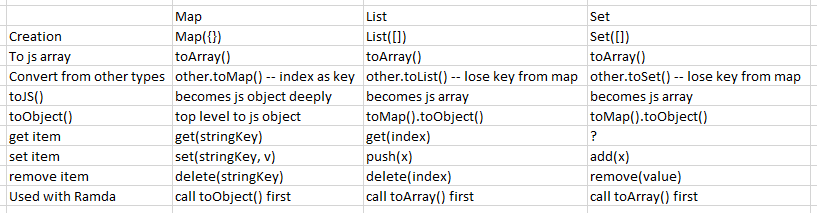
Notes about Map:
- Map.get(number) returns undefined -- keys have to be strings
- Make sure you import Map from immutable, IntelliJ wouldn't highlight missing import, it picks up JS Map automatically
merge() vs mergeDeep()
let m = Immutable.Map({
  name: 'Andy',
  pets: Immutable.Map({1:'Cat', 2:'Dog'})
});

// merge
console.log(m.merge(Immutable.Map({
  name: 'Bob',
  pets: Immutable.Map({1:'Cat', 3:'Cow'})
})).toJS()) // pets become {1:'Cat', 3:'Cow'}

// mergeDeep
console.log(m.mergeDeep(Immutable.Map({
  name: 'Bob',
  pets: Immutable.Map({1:'Cat', 3:'Cow'})
})).toJS()) // pets become {1:'Cat', 2:'Dog', 3:'Cow'}
Record:
import {Record, List} from "immutable";

let MisDefinedChartRecord = Record({
  id: '',
  description: '',
  categoryId: '',
  hierarchyIds: List([])
});

export class MisDefinedChart extends MisDefinedChartRecord {
  public id: string;
  public description: string;
  public categoryId: string;
  public hierarchyIds: List<string>;
}
Creating object and updating data:
import {createImmutableDomain} from 'domain-util';

// creating object
let chart = createImmutableDomain({
  id: 123,
  hierarchyIds: [11, 22]
}, MisDefinedChart);

// updating
let chart = chart.merge({'id': 456}); // merge doesn't return the type back, so you need to add: as MyType
Usage in an Angular app:
- stores:
- use ImmutableJs Map
- components:
- derived from map.toArray() or list.toArray()
- note: item.fks.toArray() // fks - remember to use toArray(), because it's a immutablejs List
Links:
- documentation: http://facebook.github.io/immutable-js/docs/
- play: http://jsfiddle.net/0qvfjhLw/
- more about what you can do: http://ricostacruz.com/cheatsheets/immutable-js.html